
ARway
Leading a Team in the Creation of an AI Powered, No-code, Multi-Level, Augmented Reality Navigation Platform

Overview
The ARway platform began with a strategic challenge: to transform a raw, developer-focused technology, into a refined and accessible product for augmented reality experiences.
My team and I were tasked with designing an end-to-end, no-code, and no-beacon solution for creating and experiencing immersive indoor AR navigation. The ultimate goal was to reinvent the way users interact with complex, multi-level venues and to provide clients with an efficient and inexpensive way to implement it.
Project Duration
January 2022 - July 2024
My Role:
Director or Product Design
Design Team Members:
1x Senior Product Designer
1x Jr Interaction Designer
Product:
An AI-Powered, No-code, Multi-Level, Augmented Reality Navigation Platform
The Problem and the Opportunity
The ARway project began with a core challenge: to transform a raw, developer-focused technology into a refined and accessible product for augmented reality experiences. Our ambition was to address the critical limitations of traditional indoor navigation, where GPS is ineffective and beacon-based solutions are costly and deliver subpar user experiences.
The ultimate goal was to provide a seamless, multi-level AR navigation solution for large, complex venues by tackling several core hurdles:
-
Product Evolution: Transforming a developer-centric Point Cloud mapping technology into a user-friendly solution capable of handling property-scale environments.
-
Indoor Navigation Limitations: Overcoming the inherent unreliability of indoor GPS and the high cost and poor user experience associated with traditional beacon-based navigation systems.
-
Digital-Physical Alignment: Achieving precise digital map alignment within dynamic physical environments without the need for expensive or cumbersome hardware.
-
No-Code Accessibility: Designing an intuitive and accessible experience for "No-Code" creators, enabling them to easily leverage complex AI and AR technology for map creation and content placement.
-
Multi-Level Complexity: Developing comprehensive multi-level navigation features to guide visitors effectively through large, intricate venues such as stadiums, airports, and universities.
My Role & The Team
As the Director of Product Design, I played a pivotal role in shaping both the strategic vision and the hands-on execution of this complex platform. I led and built the design team, crafting the entire product suite and driving product vision and feature strategy.
My responsibilities extended to:
-
Driving Product Vision & Strategy
-
Leading & Scaling the Design Team
-
Hands-on Product Design & Research
-
Establishing Design Systems & Brand Identity
-
Facilitating Cross-Functional Collaboration
I collaborated closely with engineering and product management to align design goals with business objectives and navigate the technical constraints inherent in this emerging technology.
The Solution: An Ecosystem for Spatial Computing
To solve these challenges, we designed the ARway platform as a comprehensive suite of interconnected tools. Each component is tailored to a different user need, from intricate map creation and content management to the seamless final visitor navigation experience.

Creator Portal
This web-based hub serves as the central command center for map creators. It offers comprehensive account and map management, analytics, team member management, and access to the ARway community and support.
Map Studio
The Map Studio is a powerful, visual design tool for building and populating AR maps with content. Creators can annotate their maps by utilizing the directory editor, crafting detailed turn-by-turn navigation paths, adding location pins, videos, and 3D experiences.


Creator App
This mobile app enables map creators to perform on-site map creation, editing, and content placement with remarkable precision. A critical function of this app is the patented process of achieving precise alignment between 2D floorplans and the physical world.
Visitor App
Designed for the end-user, the Visitor Mobile App is where the magic of AR navigation truly comes alive, providing an immersive and intuitive way to explore large venues.


Admin Portal
This is a dedicated, internal client management portal specifically utilized by ARway staff for administrative functions and oversight of client accounts and maps.
SDK
The SDKs provide crucial and robust integration capabilities, enabling clients to seamlessly embed or integrate the ARway visitor app's core functionalities directly into their own existing third-party applications.


The Starting Point: Raw Undefined Developer Tech
The journey with ARway began with an exploration into raw, unrefined pointcloud technology. This is what the original tech looked like when Nextech acquired Arway. As you can see there is no UX, branding or design, it was pure technology showing what a point cloud scan looked like in a web platform.

Initial State: Raw Developer Tech Nov 2021
First App Iteration
Our initial product was a mobile app-only solution that utilized Point Cloud technology for mapping single-room spaces focused on creating a proof-of-concept for pro-consumer use cases like mapping for Airbnb and real estate.
This foundational phase, from November 2021 to March 2022, was crucial for stress-testing the technology and understanding its limitations in a controlled environment. As a design lead, I helped guide the design and mentor the junior designer on this team.The initial exploration allowed users to scan and create AR experiences within a single space.
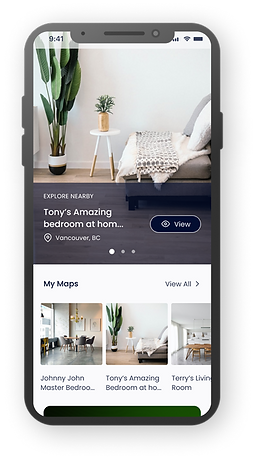

1. Recording a point cloud scan
2. Home Screen
Pivoting to a Wider Market
After completing a thorough product-market fit study, it became clear that the real opportunity lay in a new direction: large scale venues. In March 2022, a dedicated ARway team was formed, and we shifted our strategy.
Challenges Identified
-
Unscalable: The raw Point Cloud technology struggled with larger environments.
-
Inaccurate: Lacked the precision needed for complex property-scale mapping.
-
Difficult to Visualize: Point cloud data hard for users to interpret effectively in the web studio.
From Single-Room Concepts to Property-Scale Solutions

.png)
New Focus: Targeting Large Scale Venues
We pivoted from a single-room concept to a comprehensive, multi-level AR platform designed for vast, intricate environments like stadiums, shopping malls, airports, and university campuses. This strategic move became the core challenge that would define the rest of our design process.
Research & Definition
With a new strategic direction defined, we began a comprehensive research and discovery phase to ground our product in evidence and user needs. Our goal was to truly understand the indoor navigation landscape, identify key market gaps, and define our target users.
Understanding the Landscape
As we conducted competitive and market research, a significant opportunity emerged.
-
Traditional GPS consistently failed indoors, leaving users disoriented in complex environments.
-
Existing beacon-based solutions proved to be costly and time consuming to implement, requiring significant hardware procurement, ongoing maintenance, and months of deployment time at scale.
This confirmed a clear market need for a high-quality, easy-to-use AR software solution for indoor navigation. Our research validated the strategic imperative to move beyond single-room applications to address the vast challenges of property-scale navigation in complex venues. We then narrowed our focus to specific industries where the need for efficient indoor wayfinding was most acute.
Narrowing Down Target Industries and Venues
We targeted industries where the need for efficient indoor wayfinding was most acute, including:

Shopping Malls & Large Retail Stores

Hospitals & Airports

University & College Campuses

Tradeshows & Conferences

Stadiums & Arenas Venues

Museums & Galleries
Defining Our Users & Their Environments
To build a product that served both the business and the end-user, we focused our research on two primary user archetypes. These personas were critical to defining the product's feature set and user flows.
Map
Creators

Who they are: Individuals or teams responsible for mapping and annotating physical spaces, and designing the AR experiences.
Their goals: To easily create and update accurate digital maps without needing technical expertise, and to publish compelling AR content.
Map
Visitors
.png)
Who they are: The end-users who rely on the ARway mobile application to navigate through these spaces.
Their goals: To find their destination quickly and efficiently, reduce stress and anxiety in unfamiliar environments, and enjoy an immersive and delightful experience.
Mapping the Visitor Journey
The Blue Jay's Fan Persona (Map Visitor)
To deeply empathize with the ARway end-user, I created a persona for our "Map Visitor" archetype. This persona, named John Parker, represents a typical fan attending a game at a large stadium.
John's primary goal is to get to his seat and find amenities like restrooms and food vendors quickly and without stress. He's motivated by the desire to enjoy the game without the anxiety of getting lost in a massive, crowded venue. John's biggest frustration is inefficient navigation, losing time searching for his gate, or missing out on key moments due to long lines and unclear directions. By putting ourselves in his shoes, we were able to identify the specific moments of friction that a successful navigation solution would need to address.

The Journey Map
To gain a truly empathetic understanding of John's experience, I conducted an in-depth user journey mapping exercise, exemplified by The Blue Jays Fan Experience. By walking through a typical fan's day at a stadium, I uncovered a multitude of pain points that traditional navigation methods failed to address, including:
-
Pre-game anxiety: Finding the right gate and entrance in a vast, unfamiliar stadium.
-
In-venue disorientation: Navigating crowded concourses to find their specific section and seat.
-
Essential friction: Locating nearby restrooms, concessions, and merchandise with ease.
These on-the-ground insights were critical. They directly informed our feature prioritization and design decisions, ensuring that ARway's solution addressed real-world frustrations rather than just technical requirements.

Detailed Journey Map for a Map Visitor, Click to view details

Field Research
Building the ARway Brand
With a clear understanding of our users and their journey, my focus shifted to developing a distinct and impactful brand identity for ARway. I spearheaded a collaborative process to build a new brand guide based on our core strategic goals.
We retained the ARway name to build a custom brand identity that would position it as a standalone leader in the spatial computing market. The visual identity, tone of voice, and personality were all informed by our on-the-ground user research, with a focus on creating a brand that was accessible, modern, and stress-mitigating.
Our strategic decisions included a meticulous selection of colors to ensure accessibility for color-blind users and the incorporation of calming hues to counteract the anxiety often associated with indoor navigation. This work established a cohesive brand identity that perfectly positioned the product to enter the market.
This brand guide directly influenced the update and creation of a new design system. I established the new system to provide a scalable and consistent set of reusable components. This allowed the design and development teams to work more efficiently, ensuring a cohesive and high-quality user experience across all of ARway's platforms.

Click the image to view the full PDF
Designs & Solutions
The First Foundational Challenge: From Point Clouds to QR Anchors
Before we could even begin to solve for turn-by-turn navigation or multi-floor wayfinding, we faced a fundamental technological hurdle. The initial ARway technology relied heavily on Point Cloud mapping, a method that quickly proved to be a significant barrier to our vision of a scalable, precise, and user-friendly indoor navigation system.
The Problem: Point Clouds Were Unviable
We actively attempted to make this technology work, but its inherent complexities led us to a clear conclusion: Point Cloud mapping was not a viable solution.
It presented three core limitations:
-
Usability for Creators: In the web studio, it was exceedingly difficult for creators to interpret the dense point cloud data, making it nearly impossible to intuitively place content and annotate maps.
-
Discoverability for Visitors: For end-users, recognizing how to discover a map or enter an experience was not natural, as it involved non-typical user patterns.
-
Technical Scalability & Practicality: While feasible for small spaces, mapping large, multi-level venues by manually recording with a phone was an impractical and time-consuming process. We required a much faster and more efficient solution for implementation at scale.

V1: Creator mapping a room with point cloud

V1 Web Studio: The studio results of the room after point cloud mapping. As you can see, this is too difficult to interpret the space.
The Breakthrough: Anchoring with QR Codes
To directly address these issues, we innovated a new mapping approach that leverages QR codes as robust localization anchors. This strategic shift not only provided reliable and stable positioning, making the system vastly more scalable for large venues, but also streamlined the entire workflow.
This breakthrough was further enabled by our engineering team's patented AI solution, which is capable of transposing 2D floor plans into precise 3D coordinates using computer vision and sensor fusion, a critical advancement for seamless digital-physical alignment without cumbersome hardware.
The new approach delivered immediate value:
-
Improved Discoverability: Map Visitors could simply "Scan QR to launch" the AR navigation experience, a natural and intuitive user pattern.
-
Reliable Localization: The QR codes provided accurate and stable positioning within any environment.
-
Streamlined Creator Workflow: Creators no longer needed to manually scan the entire venue. They could print and anchor QR codes around a space, enabling a much faster setup

The Second Foundational Challenge: Achieving Precise Digital-Physical Alignment
A major technical and design hurdle we had to overcome was achieving precise alignment between a 2D digital floor plan and its corresponding 3D physical space without relying on expensive or cumbersome hardware. Without this perfect alignment, all subsequent AR wayfinding, navigation, and content placement would be inaccurate, leading to a frustrating user experience.
The Patented Solution: The Floor Plan Alignment Flow
Our engineering team achieved a patented breakthrough: an AI solution that transposes 2D floor plan pixels into 3D coordinates, leveraging Lat/Long, Computer Vision, and Sensor Fusion. My role was to translate this complex AI technology into an intuitive and accessible tool for "no-code" creators.
Floor Plan Image
Anchor pegs on the uploaded 2D floor plan image.

Physical Location
Anchor pegs in AR in the same locations as on the floor plan image file.


Pinned pixels of the floor plan image are anchored to the matching physical locations using AR = “Digital Twin” for web studio
I strategized and led the design for a simple alignment process that leveraged familiar UX patterns, similar to an "Uber Pin Drop" which we called the "Floorplan Alignment" flow. This feature simplified a highly technical process, enabling creators to easily and accurately anchor their digital maps to the physical world.
Floor Plan Alignment: Anchoring and auto-scaling a floor plan to a physical location to enable web studio editing
The Result: Unlocking Precision Annotation and Turn-by-turn Navigation
The floor plan alignment tool was a breakthrough that gave creators a precise method for annotating maps in the Web Studio. This patented technology streamlined workflows by allowing creators to place rich content (3D models, videos, images, hotspots, audio clips, and immersive experiences) directly onto floor plans from their computer rather than manually on-site.
This innovation saved valuable time for clients, but more importantly, it set the stage for our core user-facing features: turn-by-turn navigation and multi-level map connectivity. Together, these capabilities would define the heart of ARway, an intuitive AR navigation experience for visitors, powered by a robust set of creation tools behind the scenes.

Web studio view after floor plan has been successfully anchored and aligned. Hover state on a floor plan peg reminding the creator where the peg was anchored.
1. Designing the Core: Visitor Experience
Although our design process unfolded in parallel, developing both the visitor and creator experiences side by side, the best way to understand the impact of our work is to begin with the end-user journey. After all, every tool we built for creators was in service of enabling a seamless and engaging navigation experience for visitors.
Our challenge was clear: make indoor navigation as intuitive as Google Maps outdoors, while leveraging AR to make it more accessible, engaging and fun.
The visitor experience we designed delivered on this challenge through three key pillars:
-
A smart, searchable in-app directory for effortless discovery.
-
Intelligent route selection with accessibility built in.
-
Immersive, turn-by-turn AR navigation, including support for multi-level venues via the map connector.
1. 2D Map Viewer and Level Selector
Visitors can tap the 2D map icon while in AR to get a clear overview of the venue. A level selector button indicates their current floor and allows switching between levels, while interactive location pins provide details and let users instantly launch navigation to their desired destination.
.png)
Impact: Made multi-level navigation intuitive and seamless, giving visitors confidence and control over their journey.
2. The In-App Directory
We designed the journey to begin with a comprehensive, searchable directory, organized into categories like “Women’s Apparel,” “Electronics,” and “Amenities.” Visitors could quickly search or browse, making discovery effortless.
Impact: Reduced visitor frustration and streamlined access to essential services like restrooms and info desks.
3. Route Options & Wheelchair Accessibility
When selecting a destination, visitors could choose between fastest routes or wheelchair-accessible paths. Visitors could also view routes that were between levels.
Impact: Ensured inclusivity and adaptability across diverse user needs.
Route Visibility: Designing visible routes are on varied floor maps
A major design challenge was ensuring paths remained clear on varied floor plan styles (dark, busy, neutral). I tested multiple visual approaches, ultimately designing a dual-line route with a high-contrast core for maximum clarity and a more visually accessible experience.


Typical Floorplan
Dark Floor Plan


Busy Floor Plan
Neutral Floor Plan
Impact: Consistent route legibility across any floor plan type for improved accessibility.
4. Immersive Turn-by-Turn AR Navigation
Once a route was chosen, the app transitioned into live AR mode, overlaying intuitive directional cues onto the physical environment.
Impact: Eliminated guesswork, making navigation engaging, effortless and memorable.
Navigation Themes: Expanding Use Cases Through Customizable Route Styles
In ARway’s early stages, route guidance relied on a single path style with limited color customization. As the product expanded beyond corporate and enterprise environments, we needed a more flexible system that could support both practical wayfinding and more immersive branded experiences.
I designed a set of customizable navigation themes, including jumbo chevrons, glowing routes, spheres, and flat lines. Some were created to add visual energy for retail, events, and entertainment spaces, while others improved usability by making paths easier to follow and more forgiving when AR drift occurred. Combined with brand color customization, these themes helped ARway support a wider range of clients and environments.


Jumbo
Spheres


Glowing
Flat Path
Impact: Transformed simple navigation into a branded, fun and differentiated visitor experience.
Behind the Scenes: Building for Creators
The seamless visitor journey you’ve just seen didn’t exist in isolation, it was only possible because of a powerful set of tools we designed for Map Creators. These tools needed to balance two competing demands:
-
Sophistication: enabling the creation of accurate, multi-level, turn-by-turn maps at scale.
-
Simplicity: ensuring non-technical users could intuitively build and manage these complex AR environments.
To achieve this, our team designed in parallel: while we defined the end-to-end visitor experience, we also crafted the creator workflows that powered it. This dual-track approach ensured that every feature released, from turn-by-turn navigation to the map connector, launched with both sides of the ecosystem in place.
The next sections detail how we tackled this challenge: first, by designing the turn-by-turn creation tools, and then by solving the complex problem of connecting multi-level maps into a seamless venue-wide navigation system.
Designing the Core: Turn-by-Turn Creation Tools
The goal was clear: if visitors were to enjoy effortless, turn-by-turn AR navigation, creators needed tools that made mapping complex indoor spaces simple, accurate, and scalable.
This meant tackling two layers of design simultaneously:
-
The visitor-facing experience, ensuring navigation felt seamless and intuitive.
-
The creator-facing workflows, giving non-technical users the ability to annotate floor plans, set up routes, and manage venues without friction.
As Director of Product Design, I led the overall design strategy across web and mobile, guiding our senior product designer on studio workflows while personally owning the mobile visitor and creator app design. Together, we designed a system that made building these advanced navigation experiences as intuitive as using them.
1. Directory Builder Workspace
A critical challenge was to simplify annotating a complex 3D space. A bird's-eye 2D view would be more accurate and easier to place content more accurately than navigating a 3D environment. A key design decision was to create a dedicated, focused workspace that would appear when the directory builder tool was selected. This new frame provided a distraction-free environment to focus solely on adding location pins and defining walkable areas.


Impact: Non-technical creators could build sophisticated AR maps efficiently.
2. Onboarding & Guided Support
To ensure our clients were supported and could discover new features, we designed a layered onboarding system:
-
Quick-start modals with GIFs
-
Step-by-step guided tours
-
Always-available in-app tooltips


Impact: Enables creators to learn at their own pace and build confidence.
3. Path Mapping Challenge: A Lesson in Collaboration
Our journey designing the turn-by-turn path tool was not without its challenges. We initially aligned on a plan to use shape-based tools to block off inaccessible areas. The Senior Designer spent 2 weeks designing this feature based on the approved requirements.
However, during a subsequent review, our engineering team revealed that this solution was not technically feasible. This resulted in a two-week delay and highlighted a critical need for a more robust cross-functional process. To prevent this from happening again, I led the creation of a new, company-wide design collaboration process to ensure alignment with stakeholders, product and engineering from the outset. (Streamlining Product Delivery) We quickly pivoted to a line based approach and kept moving forward.
Our new approach: a tool to draw the paths themselves. The design enables creators to draw straight or curved paths, define their widths, and select from "walkable only" or "all access/wheelchair accessible." Our goal was to make this highly complex task as intuitive as possible, especially for users without a design background.


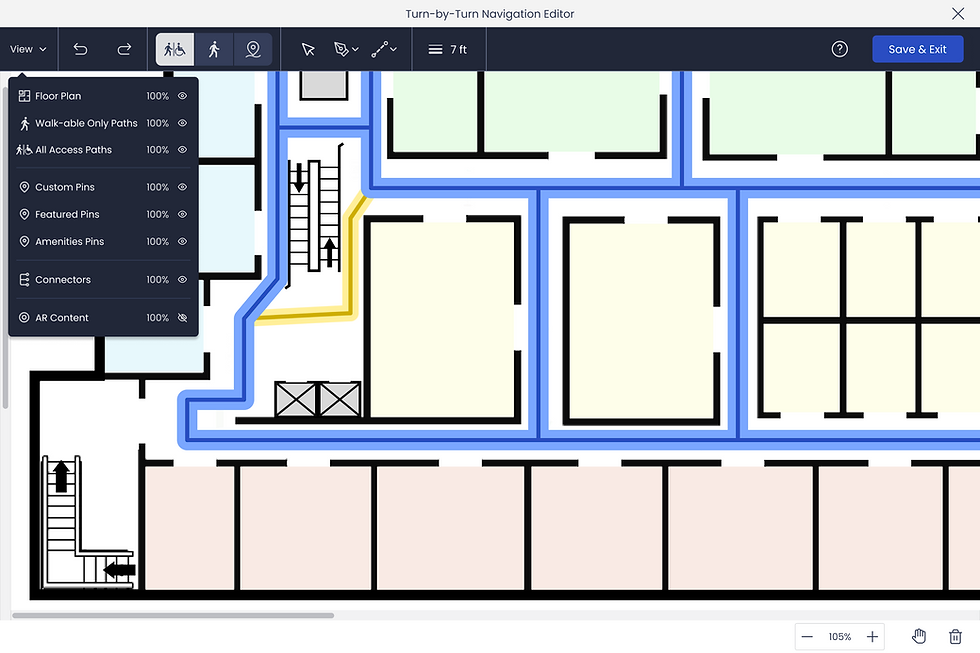
Impact: Simplified a highly complex task, strengthened cross-team collaboration and accelerated feature delivery.
4. Location Pin Placement & Customization
Creators could place pins directly on paths, with instant validation (green outline) when positioned correctly. Each pin included robust customization: branding, images, descriptions, documents, and categorization.


Impact: Allowed venues to create rich, branded experiences while ensuring accuracy.
5. Post-Launch Analytics
After launch, client feedback revealed the need for better visitor insights. We added analytics to the My Maps area, giving creators visibility into:
-
Route analysis (which paths were most used, individual routes taken, time of day and duration)
-
Destination popularity, Time of navigations,
-
Visitor feedback (e.g., thumbs-up ratings and comments)


Impact: Enables data-driven decisions about venue layouts and content strategy.
Outcomes
We built a turn-by-turn navigation system that was intuitive, inclusive, and scalable. Visitors could confidently navigate complex venues in real time, while creators had powerful, no-code tools to build and manage AR maps at scale.
This success directly set the stage for the next evolution of the product: enabling navigation across multi-level environments with the Map Connector tool.
Designing the Core: Map Connector Tool
If turn-by-turn navigation made ARway useful for single level spaces, the Map Connector tool unlocked scale. It allowed creators to link multiple maps, levels, zones, or areas, into a seamless, multi-level venue map. With this feature, ARway transformed from an indoor wayfinding solution into a platform capable of powering large-scale venues like airports, malls, and convention centers.
The Design Challenge
-
Creator Complexity: Linking maps together accurately across elevators, stairs, escalators, corridors, and bridges was a cognitively heavy task. We needed to simplify it so non-technical creators could succeed.
-
Visitor Experience: Routing had to remain seamless. Visitors shouldn’t need to think about “switching maps” navigation should feel like one continuous journey, regardless of floors or zones.
-
Flexibility: Venues differ, some have levels, others have zones, so we needed to support multiple naming conventions and structures.
-
Reliability: Connectors needed to be editable post-setup, so creators could update or disable them in real time (e.g., escalator out of service).
1. Building the Venue Map
Creators could build a venue map by selecting individual maps (levels or areas) within the CMS or Studio. They were prompted to:
-
Group maps into a unified structure "Venue Map".
-
Enter venue details (title, description, branding)
-
Define naming conventions for levels/zones (e.g., “Level 1 / Level 2” vs. “Zone A / Zone B”)


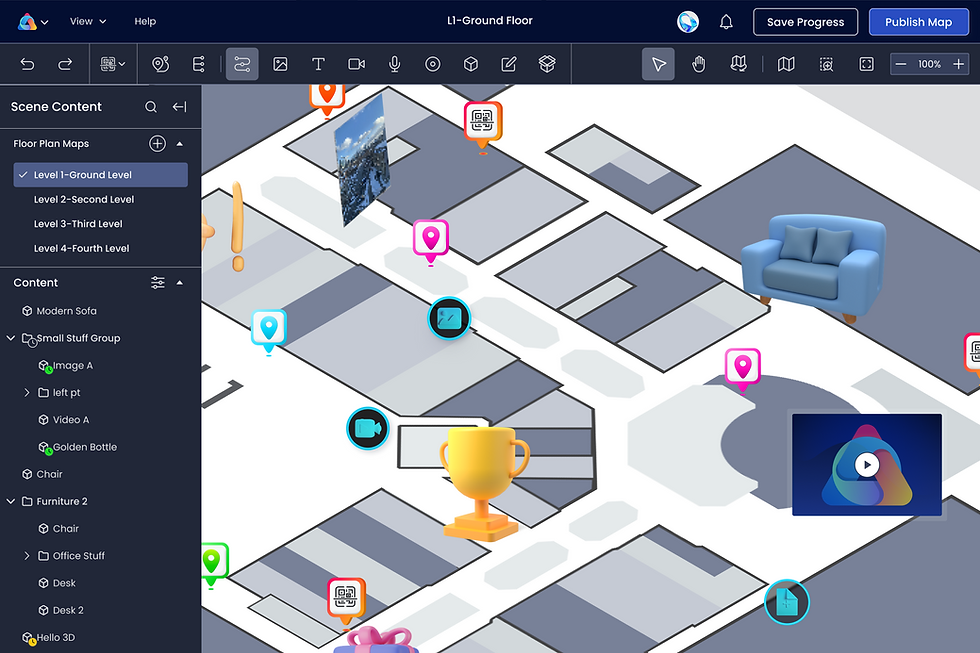
Impact: A flexible system that could adapt to diverse venue types beyond traditional multi-floor buildings.
2. Adding Connector Pins
Once a venue was defined, creators were onboarded through guided modals explaining how to link levels via connector pins.
-
Elevators: Creators named elevator groups, pinned them across levels, and could later edit or disable individual elevators if out of service.
-
Escalators: More complex, creators specified single-direction vs. dual-direction. For single, they placed entry and exit pins; for dual, just one pin per level.
-
Stairs, bridges, corridors: Supported as straightforward two-point connectors between maps.


Impact: Reduced risk of set-up errors while ensuring visitors received accurate routing through complex venues.
3. Connector Manager
To simplify ongoing management, we designed a Connector Manager, a centralized dashboard where creators could:
-
View all connectors at a glance as well as edit and make changes
-
Toggle connectors on/off (e.g., if under maintenance)
-
Validate connections to ensure continuity between maps


Impact: Gave creatos ongoing control and confidence, ensuring venue maps remaind accurate and up-to-date..
Outcome
The Map Connector tool completed ARway’s core navigation system, enabling:
-
Scalability: From single-level maps to large, multi-floor or multi-zone venues.
-
Creator Usability: Intuitive tools, onboarding, and management systems that demystified a complex process.
-
Visitor Seamlessness: One continuous navigation journey, regardless of venue complexity.
Together with turn-by-turn navigation, this feature positioned ARway as a true large-scale AR wayfinding solution.
Watch ARway in Action
This video demonstrates ARway in the real world, showcasing both sides of the platform. Visitors navigate seamlessly through complex venues with turn-by-turn AR guidance, while creators build, align, and manage maps directly from the web studio. Together, these experiences illustrate the power of ARway as a scalable indoor navigation solution.

Beyond the Core
Once the foundational system of alignment, navigation, and connectors was in place, we rapidly expanded ARway’s capabilities to support enterprise needs and unlock richer experiences. These additional features demonstrated the scalability of our platform and broadened its adoption across industries:

User Management
Introduced role-based access with Owners, Admins, Editors, and Guests. Permissions could be customized at both user and member levels, giving enterprises fine-grained control over how teams collaborated in the platform.

AR Content & Studio Enhancements
Improved the Map Studio to make content placement faster, more accurate, and easier to manage at scale. Expanded AR content capabilities to include interactive hotspots, audio, video, Unity-based experiences, and timed/scheduled content for seasonal or event-driven activations.

Kiosk Mode
Designed a mall-style kiosk experience where visitors could search destinations, preview routes, and then seamlessly hand off navigation to their mobile device by scanning a QR code from a digital mall display.

Guided Tours
Created a tool for curated visitor paths with start and end points, blending navigation with storytelling for exhibitions, campuses, and training environments.
Outcomes & Impact:
0–1 Product Launch
Built and launched ARway.ai in just 24 months
Sales Pipeline
$3.6M Generated
Platform Reach
Deployed across iOS, Android, Apple Vision Pro, Magic Leap and SDK Integrations
Market Adoption
200+ subscribers, 7,800+ users, 45+ paid pilots
Industry Recognition
Apple Developer Program
Key Partners & Pilots
Gov't of Canada, Toronto Metropolitan University, Boston Children's Hospital, Tanger Outlets, Localiza
Navigating Challenges & My Leadership Responses
The journey was not without significant challenges. Early on, we faced:
-
Resource Constraints: A small design team spread thin.
-
Funding Limitations: Impacting team size and speed.
-
Market Barriers: Lack of established enterprise sales channels.
-
Leadership Change: An executive departure just six months into the product build.
To keep momentum, I stepped in with proactive leadership:
-
Hired and onboarded a new designer to own the critical floor plan alignment feature.
-
Took on additional product management responsibilities, including strategy and vision.
-
Created ARway’s full brand guide and visual identity personally.
-
Successfully balanced ARway’s design leadership while managing three other major Nextech products in parallel.
Key Learnings & Leadership Growth
This experience shaped not only ARway as a product but also my growth as a design leader:

Collaboration
Learned the critical importance of deep, early alignment with product, engineering and data science when designing around novel technologies.

Process Evaluation
From a major “path tool pivot,” I spearheaded a new company-wide collaboration process, improving cross-functional alignment between Product, Design, and Engineering.

Scope & Capacity Management
Successfully led ARway’s complex design strategy while guiding UX for three additional Nextech products simultaneously.

Mentorship
Mentored designers and new PMs, reinforcing design best practices in AR, AI, and no-code platforms.

Strategy
Adapted core design principles for the unique challenges of emerging technologies.
Conclusion
ARway was more than a product launch, it was the creation of an entirely new category of indoor navigation. Leading this product from 0–1, I not only shaped its design strategy and execution but also strengthened company-wide design processes, mentored new talent, and delivered a solution recognized by partners, enterprises, and industry leaders alike.
Thanks for Reading
Check out more of my projects, or reach out if you want to learn more about this one!


